Professional sequential numbering software for tickets, invoices, raffle tickets and variable data printing.
(Official website of the Numerador Custombit numbering software)
Automatic numbering of tickets and documents
Numerador is a professional Windows-based numbering software designed for print shops and commercial printers.
It allows precise sequential numbering, Bates numbering, and variable data printing for
numbered forms,
invoices,
vouchers,
raffle tickets,
ID cards,
bulk mailings,
and any printed material requiring sequential numbers and variable data.
Numerador generates sequential numbers or variable data on each printed document.
Digital Numbering Machine: a software equivalent of the traditional mechanical numbering machine used in printing.
Bates Numbering Software for Legal and Corporate Documents
Numerador includes advanced Bates numbering capabilities, ideal for legal documents, contracts, and document management workflows.
Generate consistent, sequential identifiers across large document batches with full control over prefix, suffix, and formatting.
Key Features
Automatic sequential numbering
Sequential numbering with Code 39 and Code 128 barcodes
Bates numbering for legal documents
Variable data printing
QR codes
WYSIWYG
Numerador Custombit!
1 - Simple and Intuitive
Sequential numbered labels are placed using the mouse, and can be finely tuned with the keyboard arrow keys.
Numerador is a WYSIWYG editor: “what you see is what you get”.
2 - Safe
By placing the labels directly over the scanned or exported image minimizes the risk of positioning errors.
3 - Efficient
Numerador is designed to operate with minimal computer resources while producing prints of the highest quality.
4 - Reliable
Reliable numbering and variable data results. ‘Numerador Custombit’ simply works.
Sequential and Variable Data
On a pre-designed background image, you can place:
🏷Sequential numbering labels 🏷Barcode numbering labels (Code 39 and Code 128) 🏷Variable text labels 🏷Variable image labels 🏷QR code labels
Numbering labels
Numerador is a graphical editor that allows you to place numbering and variable-data labels on a background image in a simple, safe, fast, and efficient way.
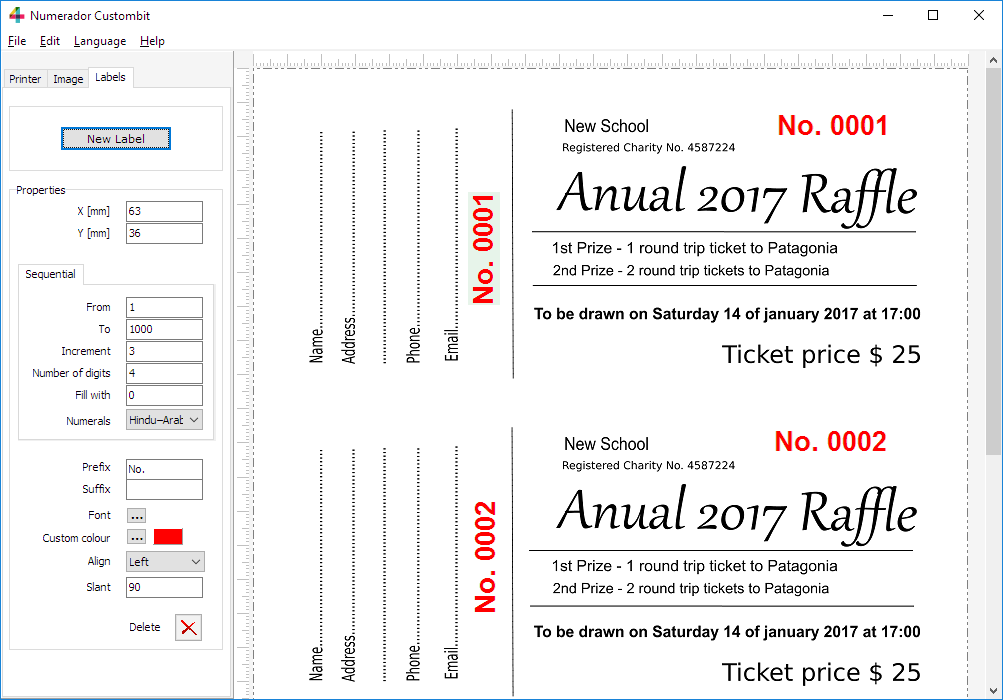
Raffle numbering with Numerador Custombit
Ticket design with barcode numbering
Automatic Numbering for Printing
In modern printing workflows, it is common to require
unique numbers on each printed document. This technique,
known as sequential numbering, is used for tickets,
passes, receipt stubs, forms, and many administrative
documents.
With Numerador Custombit numbering software, printers can automatically generate
an entire sequence of numbers without manual intervention,
reducing errors and speeding up production.
You can place the number of labels you want.
Numbering labels are independent from each other and have their own properties:
• X and Y Coordinates
Labels' position can be set using X and Y coordinates, or by
dragging the label with the mouse or holding down the CTRL key
while pressing either the left, right, up or down arrow.
• From - To
Are the beginning and end of the series.
• Increment
Difference between one number and the next in the series. It can
be a positive or negative integer (increment or decrement).
• Number of digits
The number of digits in the integer. If needed it will be completed
with leading characters contained in the “Fill with” field.
• Prefix
Any text you want to appear before the number.
• Suffix
Any text you want to appear after the number.
• Font
Select font, style, size and effects.
• Custom color
Select the color from the Color Dialog Box.
• Align
Horizontal alignment to left or right.
• Slant
Angle of rotation (in degrees).
• Numeral system
Hindu-Arabic, Chinese, Japanese or Roman Numerals; Supports multiple numeral systems worldwide.
Variable Data Printing (VDP)
In Variable Data Printing (VDP), variable data refers to any text, image, or code that changes from one printed piece to the next within a print run.
This allows each ticket, badge, or document to be uniquely personalized, such as with different names, numbers, QR codes,
or images-enabling targeted communication and professional customization in commercial printing jobs.
×
Variable Texts
You can add variable text labels anywhere on your form or background image. The content for each label is taken from a
list of text values, which you can quickly populate by copying and pasting your data.
This feature is ideal for personalizing tickets, badges, or documents with names, codes, or any other
unique information for each print.
Variable QR Codes
Numerador Custombit also supports variable QR code labels.
Each QR code is generated from a list of data values you provide, allowing every printed item to have a unique QR code.
Simply copy and paste your list of texts or URLs, and the software will automatically create and place the corresponding QR code
on each document.
Variable Images
Numerador Custombit allows you to place variable image labels directly onto the background image of your form or document.
The images for each label are automatically selected from a list of filenames, which you can easily fill by simply copying and pasting
the list of image names. Each printed piece will display the corresponding image from your list, enabling fast and flexible variable image printing.