Sequential Numbering Software and Variable Data Printing (VDP)
Numerador Custombit is a professional sequential numbering
and Variable Data Printing (VDP) editor built for print shops and production environments.
It combines a powerful WYSIWYG layout editor with advanced variable-data controls,
enabling accurate output of sequential numbers, variable text, variable images, QR codes,
and barcode labels from a single workflow.
Sequential Numbering Module
Numerador automates sequential numbering on
receipts,
invoices,
event tickets,
raffle stubs,
serial numbers,
ballots,
ID cards,
and any printed document requiring consecutive numbering.
The software works efficiently with pre-printed forms, using a background image as a
visual reference for positioning where the numbers will be printed. A PDF file can be
used as a background image. You can print the background together with the numbering
and variable data, or print only the added data when the form is already pre-printed.
To obtain a PDF file, select Microsoft Print to PDF or another virtual PDF printer as the print destination.
It requires minimal system resources, delivering precise and reliable numbering from the first printed piece.
Variable Data Printing Module
Numerador prints
variable text,
images,
barcodes,
and
QR codes
with different data for each printed piece.
Ideal for personalized invoices, event invitations, ID cards, checks, tickets, diplomas,
pre-printed forms and documents, and other applications where each printed piece contains unique data.
Numerador lets you import variable data from CSV files, copy and paste it from another
application, or enter it manually. The data is then automatically applied to each printed piece according to the selected template.
Numerador Custombit is designed for
print-production workflows that require accurate sequential
numbering and variable data printing. It is optimized for
numbering, field placement, and variable output, rather than
general graphic design or layout composition.
Numerador Custombit is built on four core principles:
1 - Simple
Intuitive interface with minimal learning curve—get started immediately without complex training or documentation.
2 - Secure
Complete control over exactly which data prints and where—precision placement and data integrity on every document.
3 - Efficient
Process thousands of documents without system slowdown—lightweight architecture designed for high-volume production environments.
4 - Reliable
Precise, consistent results on every print run—zero tolerance for errors across large batches.
How It Works: Edit Objects
Numerador Custombit uses a flexible "Edit Objects" system (also called "Labels" in the interface)
that allows you to layer multiple types of information on your document:
🏷Labels (Edit Objects):
In Numerador, these Edit Objects are called "Labels"—representing an editable field for sequential numbering
or variable data that can be positioned on the program's editing panel, layered over your pre-designed background image.
Types of Edit Objects (Label Types)
Numerador offers two classes of edit objects:
variable data labels and
sequential numbering labels.
One or more of these labels
can be positioned over a background image that serves as your design template:
Variable Data
🏷Variable Text Labels 🏷Variable Image Labels 🏷QR Code Labels
Using Sequential Numbering Labels
Here we showcase practical use cases where Numerador Custombit excels through professional efficiency and ease of use.
Use Case: Sequential Numbering with Numbering Labels for Raffle Tickets, Event Tickets, and Receipts
This example demonstrates how Numerador automates sequential numbering across large print runs without
manual intervention. Numerador applies a unique, consecutive number to each document copy automatically.
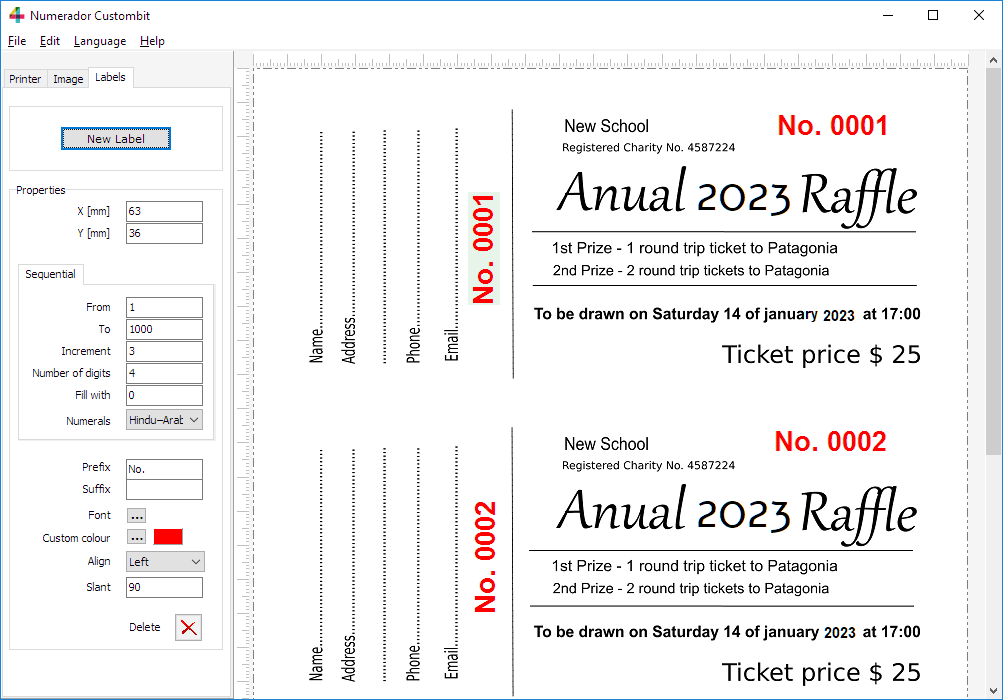
The image below shows Numerador's graphical interface with the print layout panel
displaying a pre-designed background image containing 6 raffle tickets per sheet.
Each ticket includes two sequential numbering labels—one positioned horizontally and one vertically.
When you print the complete series, every copy receives unique, sequential numbering in both locations simultaneously.
Raffle numbering with Numerador Custombit
Numbering labels' properties
Sequential numbering labels are independent of each other, and their properties are fully customizable:
• X and Y Coordinates
Labels' position can be set using X and Y coordinates, or by
dragging the label with the mouse or holding down the CTRL key
while pressing either the left, right, up or down arrow.
• From - To
The starting and ending numbers of the series.
• Increment
Difference between one number and the next in the series. It can
be a positive or negative integer (increment or decrement).
• Number of digits
The number of digits in the number.
• Fill with
The character used to pad the number to the specified number of digits.
• Prefix
Any text you want to appear before the number.
• Suffix
Any text you want to appear after the number.
• Font
Select font, style, size and effects.
• Custom color
Select the color from the Color Dialog Box.
• Align
Horizontal alignment to left or right.
• Slant
Angle of rotation (in degrees).
• Numeral system
Hindu-Arabic, Chinese, Japanese or Roman Numerals; Supports multiple numeral systems worldwide.
Cut-and-stack numbering
These jobs can be prepared by configuring the numbering label properties and
selecting the appropriate state of the “Collate” checkbox. Independent numbering
sequences for different positions on the sheet can thus be used to produce consecutive stacks after cutting.
Use Case: Sequential Numbering with Barcodes for Tickets and Receipts
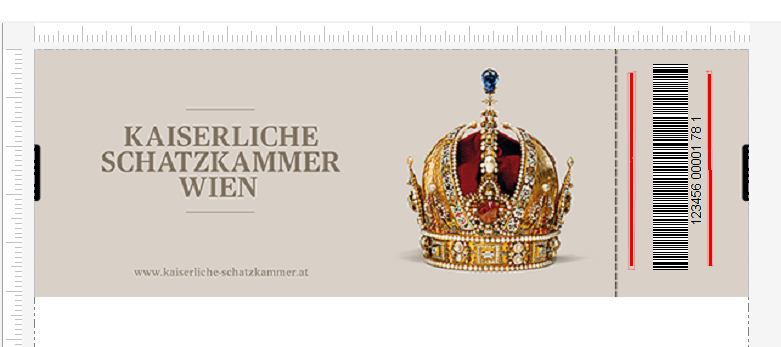
This second sequential numbering example uses sequential barcode labels instead
of simple numbering labels. These labels serve the same function as the numbering
labels shown above, with one key difference: each copy prints with a unique,
sequential number rendered as a barcode—either Code 39 or Code 128 format.
This approach is ideal for applications requiring machine-readable identifiers,
such as inventory tracking, compliance documentation, document management,
or any workflow where barcode scanning is part of your process.
Ticket design with barcode numbering
Use case: Document Pagination Workflow for Legal & Government
Step-by-step production workflow breakdown
of a use case in which many government agencies,
law firms, notary offices, and printing contractors need to paginate documents consecutively.
This is standard practice when working with large offset print runs of preprinted forms and
templates — for instance, several thousand folio sheets already produced via offset press,
where only the sequential folio numbering remains to be applied through variable data printing (VDP).
See a quick example on YouTube
We also build custom solutions.
Need to print sequential numbers or variable data directly from your own database?
Do you have a sequencing rule or variable field specific to your business?
Contact us
Using Variable Data Printing (VDP)
In Variable Data Printing (VDP), variable data refers to any text, image, or code that changes from one printed piece to the next within a print run.
This allows each ticket, badge, or document to be uniquely personalized, such as with different names, numbers, QR codes,
or images-enabling targeted communication and professional customization in commercial printing jobs.
Importing Variable Data from CSV Files
Import variable data from CSV files. Select the column you want to use and load its values into a variable data label
(text, image, or QR code). You can also enter the data manually or copy and paste it from another application.
Variable Data Printing diploma example - personalized diploma with variable text and images
×
Variable Texts
You can add variable text labels anywhere on your form or background image. The content for each label is
taken from a list of text values, which you can load by importing a column from a CSV file, copying
and pasting your data, or entering it manually. This feature is ideal for personalizing tickets,
badges, or documents with names, codes, or any other unique information for each print.
Variable QR Codes
Numerador Custombit also supports variable QR code labels. Each QR code is generated from a
list of data values you provide, allowing every printed item to have a unique QR code.
You can load the data by importing a column from a CSV file, copying and pasting a list of
texts or URLs, or entering it manually. The software automatically creates and places the
corresponding QR code on each document.
Variable Images
Numerador Custombit allows you to place variable image labels directly onto the background
image of your form or document. The images for each label are selected from a list of image
file paths, which you can load by importing a column from a CSV file, copying and pasting
the paths, or entering them manually. Each printed piece will display the corresponding
image from your list, enabling fast and flexible variable image printing.